Real screens with sample data, then every module as it runs today. Nothing here is a roadmap.
See it in 60 seconds
What it looks like when the AI hands over the baton
Real screens from Stafeta (sample data). Not a demo video: this is what you see in the first ten minutes.
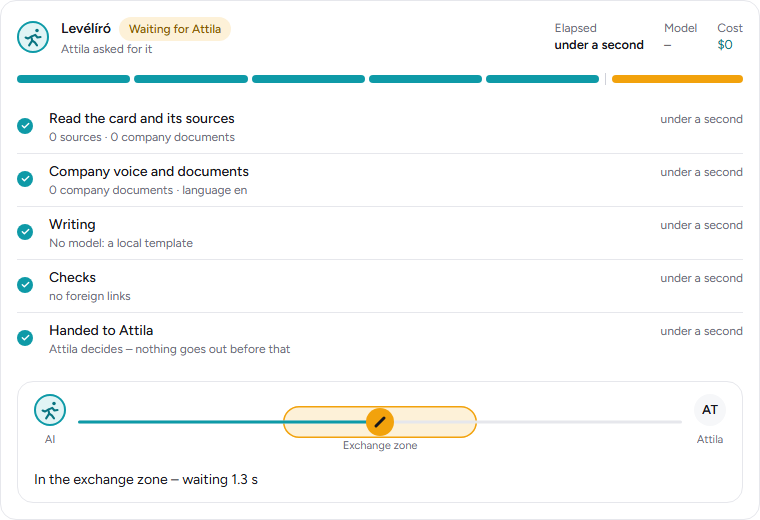
The AI run, step by step
It reads the card and the company documents, writes the draft, checks it (no foreign links, no leaking data) and puts it on the baton: it waits in the exchange zone until a person decides. Nothing goes out before.
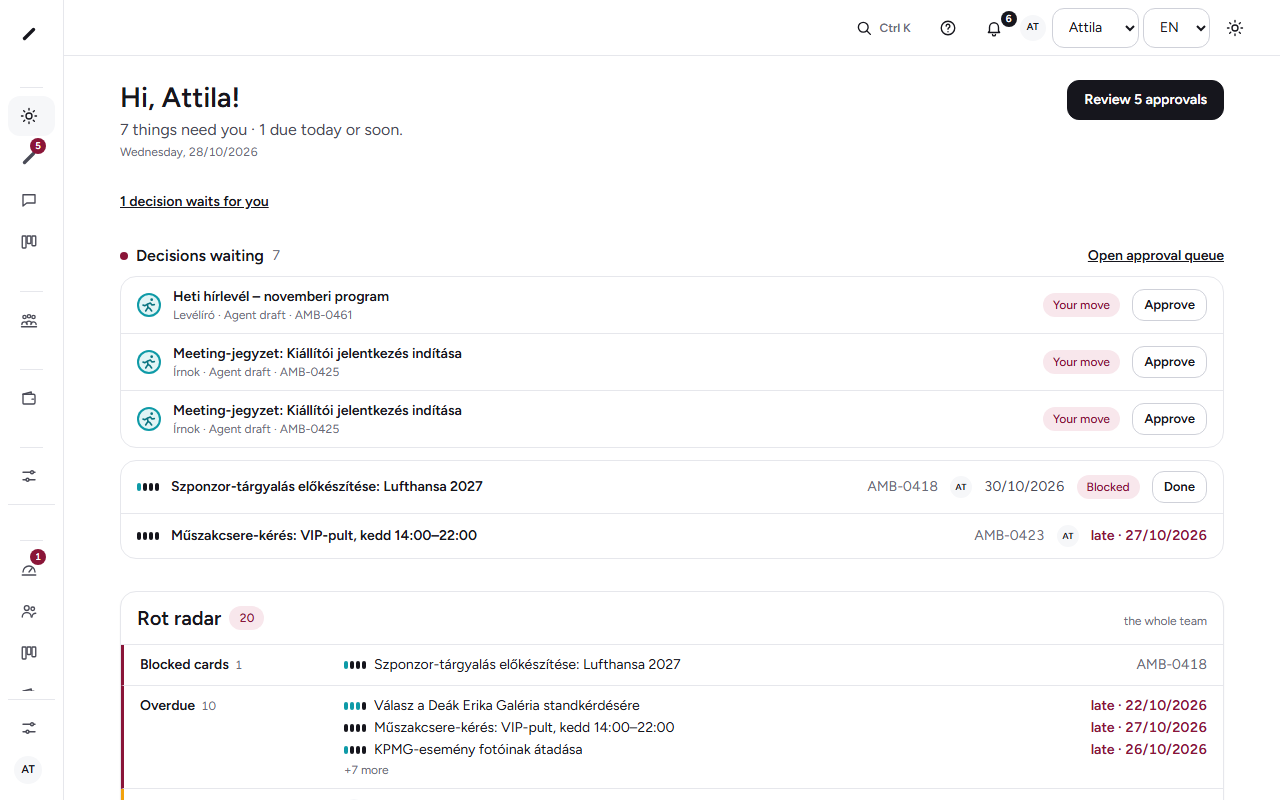
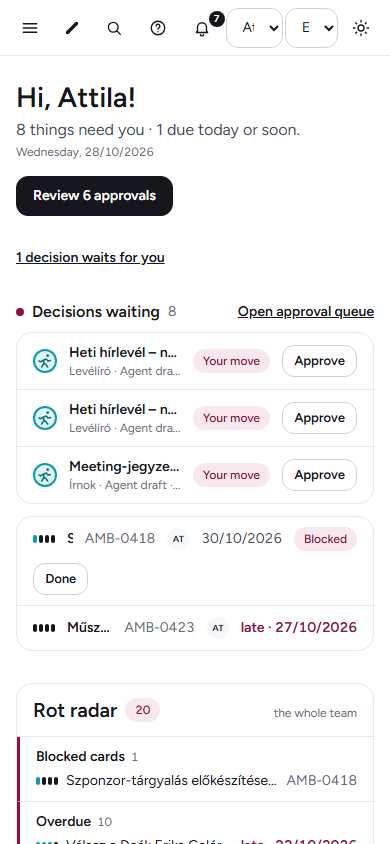
My day: what waits for you
Decisions, slipping deadlines, the rot radar – one screen in the morning, not six apps.
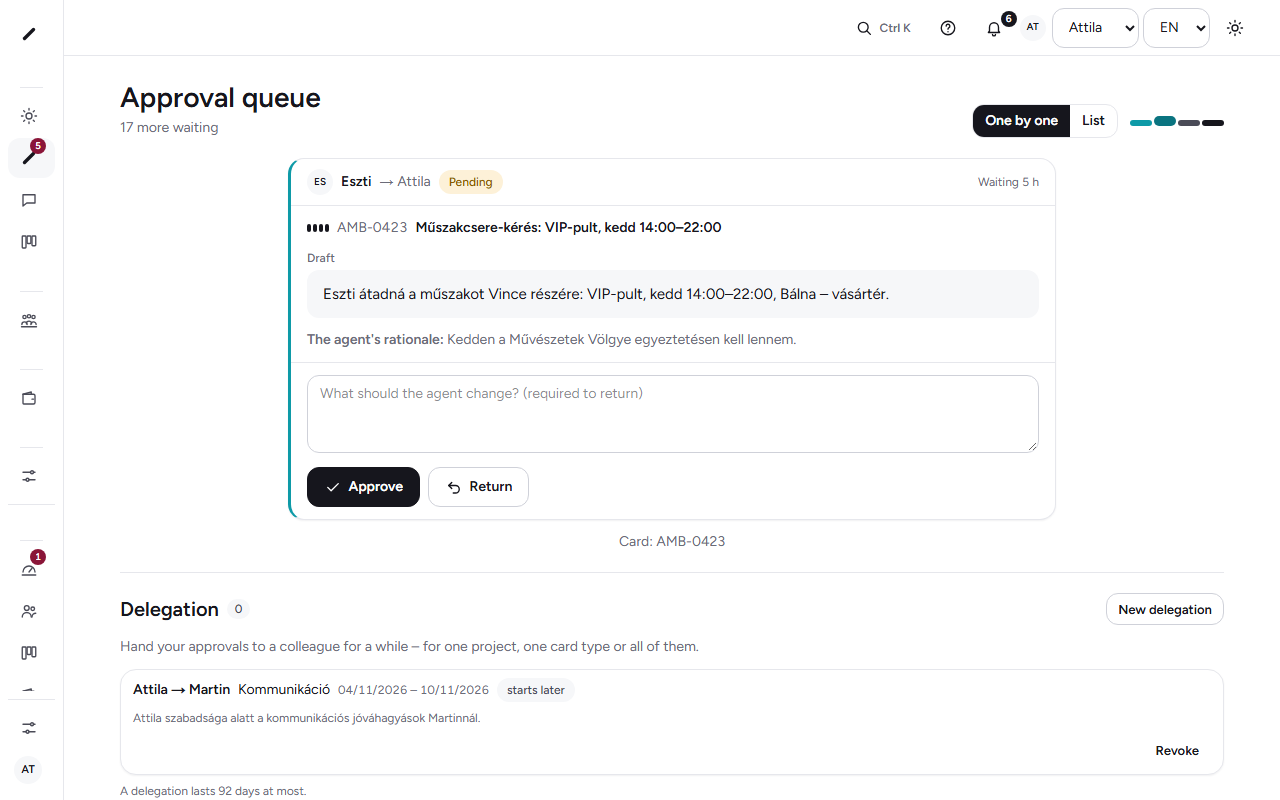
Approvals: the exchange zone
The agent's draft, a colleague's request, leave, an expense – one queue. One by one or in bulk, returned with a reason.
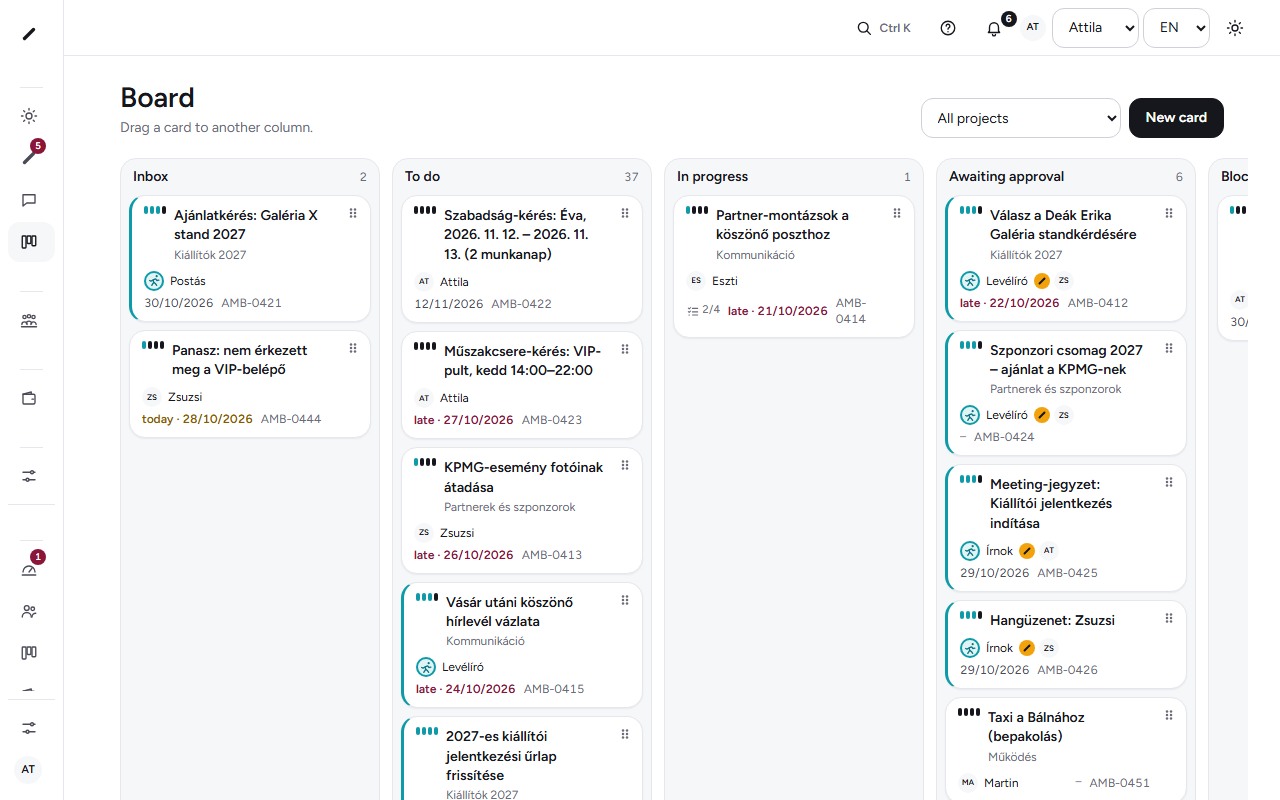
The board: who carries what
Every card shows its owner – person or agent –, the lane, the due date, and the baton when the AI is handing over.
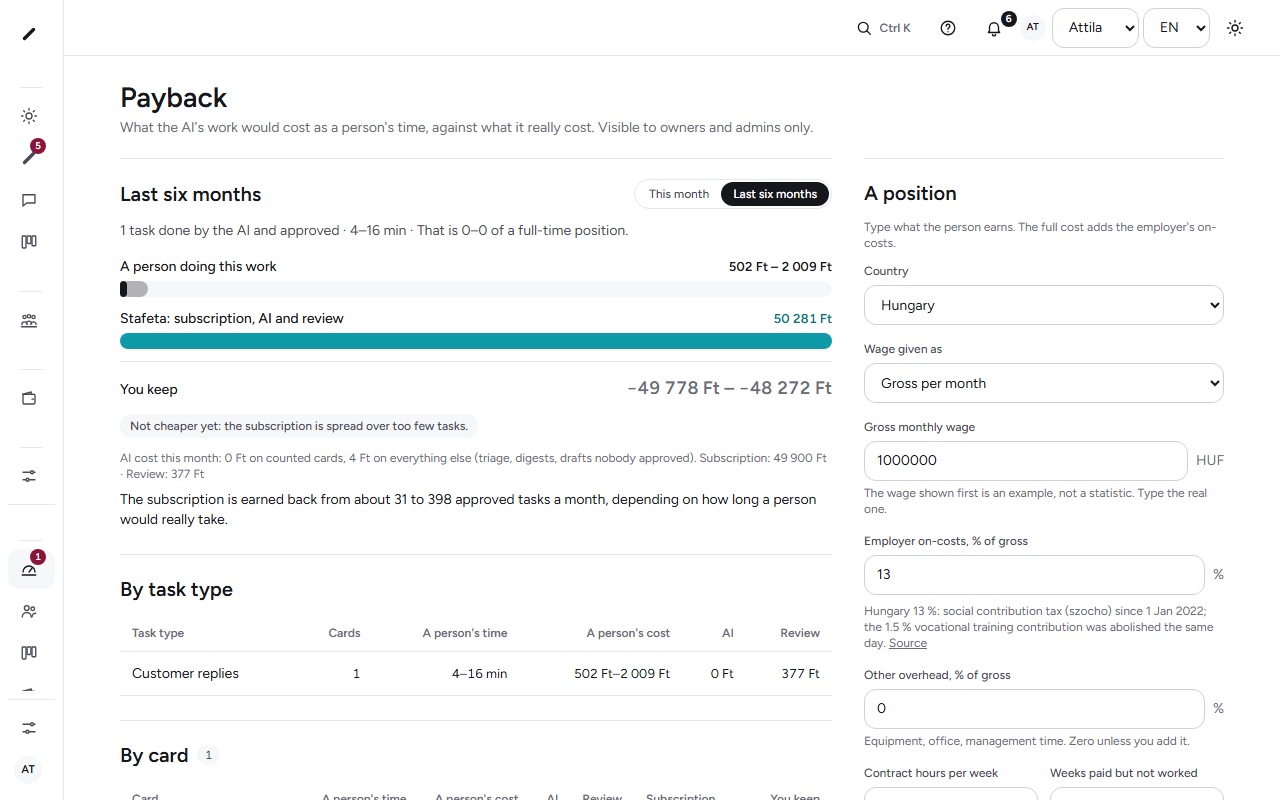
Payback, not a promise
What the AI's approved work would have cost in a person's time, against what it really cost – with your wage figures, in your browser.
Sample data from a six-person events company. The numbers will be yours.
What is not here: video calls, payroll, accounting, your office suite. Those stay where they are.
Everything in one place
One platform, every module your team needs
Open a group to see what it does. Every function below is live in the product today; nothing here is a roadmap.
One place where the work runs
What your team gets
Web and iOS app, one shared data model. Nothing has to be pasted into a chat by hand.
My dayDue cards, approvals and blockers in one list. One screen in the morning, not six apps.
One-finger approvalThe agent puts down a draft. One swipe to approve, or send it back with a voice note.
Meeting → cardsAn online meeting bot or a phone recording, transcribed on the device. Every “I’ll do it” becomes a card with an owner and a deadline.
ChatChannels, threads, voice. The agent is a member of the channel: you can ask it, and it speaks up when a card slips.
DocumentsRules, templates and client files in one company brain. What you write here is how the agent works.
Owner dashboardWho is overloaded, what is stuck, what is waiting for approval, how much the AI took on this week and what it cost.
Real work starts from the card
Work from the card
Not just a note and a deadline: a card starts a run in the tools your company uses. Every step has a class, and whatever leaves the company leaves with exactly the content you approved.
A newsletter from the approved draftFrom the card’s text the campaign is built in Mailchimp: audience, subject, timing, a test to the team. Sending is the last step, and it happens only after the approval.
The approval is bound to the contentThe approver sees exactly what goes out: subject, number of recipients, send time, a preview of the content. If anything changes, the earlier approval is void and we ask again. An approval lives 24 hours.
Drive, Docs, sending mailReading from Drive, a document in Docs, sending from your own Gmail or Microsoft account – each step classed: reading runs by itself, creating is a draft, sending only with an approval. We ask for no other right.
Mail in and out – without your inbox
E-mail
We do not ask for your mailbox. What you forward becomes a card; the reply goes out from your own account, after you approved it.
One forwarding addressEvery company gets its own address. What you forward or redirect there becomes a card in the inbox, attachments included, with replies threaded onto the same card. Executables are never stored.
Replies from your own accountA reply draft is an approval. Whoever approves it sends it from their own Gmail or Outlook account, and it lands in their Sent folder. An automatic approval never sends mail.
Send-only permissionFrom Google and Microsoft we ask for the right to send and nothing else. Read, modify and “full mailbox” permissions are refused in code – even when the provider would offer more.
Person-to-person approvals too
Approvals for people
Not only the agent’s work waits for an approval: a post, an offer, an expense, a leave request. The same exchange zone, the same log.
“Ask for approval” on the cardPick who, add a sentence, and the card joins their queue. A return always carries a reason; the card does not move on until then.
A queue, not one by oneThe approver filters by type and closes the routine ones in one move. What used to be the owner’s bottleneck can be shared out.
A deputy and a decision logOn leave? Name who decides for you for a period; the log shows it was decided as a deputy. Every decision – who, when, what, why – can be found again, on the card and in the company’s decision log.
Lead, proposal, complaint – one pipeline
Customers
A contact can be added by hand or come from an e-mail; a complaint has a deadline; a routine reply comes from a template – after approval.
Contacts and the pipelineCustomer, supplier, partner in one place, with their cards, documents and files. Four stages – lead, proposal, contract, active –, a value and an expected close, won or lost with a reason. When a thread goes quiet, the follow-up agent writes a draft.
Reply templates and complaints with a deadlineAn inbound e-mail becomes a card; the routine reply comes from a template, filled with the name and the reference number, and goes out after approval. A complaint is its own card type with an SLA clock: the list shows how much time is left.
Public formsEnquiries, applications, complaints from a link or a QR code; every submission becomes a card in the Inbox, the sender gets a reference number, Turnstile keeps the bots out.
Expenses, receivables, supplier invoices
Money
Stafeta does not invoice and does not transfer money: it gives you the decision and the record, the money moves in the bank.
Expense claims with a receipt photoAmount, category, how you paid, a photo of the receipt from the phone; it lands in the finance person's queue and closes as "reimbursed" after approval. Only the people involved see the amount.
Who owes us, whom we oweAgeing and the biggest debtors from your invoicing tool's export (Billingo, Számlázz.hu, Moneybird); supplier invoices as cards with approval, "to pay" and "paid" states.
VAT deadlines as cardsCards generated ahead for the finance person in your country's filing rhythm (presets today: Hungary and the Netherlands), marked "verify" – you file the return.
Your client can take the baton too – no account
Client portal
An offer, a plan, a newsletter preview: through a scoped link the client looks, approves or returns, comments, uploads a file. They see nothing else.
One link, one card, one personThe link is bound to an e-mail address, expires (1–30 days), can be revoked at any time, and by default opens with a one-time code sent by e-mail. The client sees only the shared card.
Decision, comment, fileApprove or return with a reason, comment, upload the signed PDF – all of it lands on the card, logged, with the client’s address.
A client’s decision is its own rowA guest’s approval is not the team’s: it shows separately. It releases a run step on its own only when the company has switched that on for that tool.
Thirteen weeks on one screen, ninety minutes a week
Weekly numbers
A few numbers with an owner and a weekly target, and a weekly review that produces cards and decisions – not notes.
ScorecardCounts, percentages, money, hours – every number has an owner and a weekly target. Thirteen weeks in a row, green or red. The platform fills in what it can: overdue cards, open approvals, this week’s AI cost, receivables.
Weekly reviewGood news, scorecard, goals, headlines, last week’s to-dos, then the issues – a fixed agenda, 90 minutes. What gets solved becomes a card with an owner and a date, and enters the decision log.
Quarterly goalsThree to five goals for a quarter, with an owner and the cards tied to them. In the review, one glance: on track, off track, done.
Contracts, GDPR requests, access
Registers
Three lists that used to live in a spreadsheet or in someone’s head. Stafeta does not sign, give notice, delete or grant rights – the register and the card remind, people act.
Contracts with notice datesOther party, term, notice period, auto-renewal, value. The notice date puts a card among the deadlines 90, 60, 30 and 14 days ahead; the signed PDF sits on the card.
GDPR requests with a one-month clockAccess, erasure, rectification, objection: received, channel, handler, a checklist per type. The shared board shows only the number and the type, never a name. An extension only with a reason, within the first month.
Systems and accessWho can get into which tool, at what level, since when. On leaving, revocation becomes a list, not a memory. Stafeta never sees a password.
Frontline
For the kitchen, the warehouse and the road
It does not only work from a desk. Shift teams work from a phone or the site’s tablet, and the rules are built in.
A kiosk tablet with a PINOne shared tablet at the site: staff sign in with a PIN and are signed out after two idle minutes. The tablet never holds a personal session, sees only its own site’s lists for today, and is revoked on the web in one move.
Checklists with photo evidenceFridge temperatures, opening and closing, stock counts: OK or problem per step, readings with a range, a photo of the thing – never of a person. An out-of-range value makes a card for the responsible person. Works without a network and syncs later.
Rota with legal notice warningsA weekly rota per site and role, open shifts, swaps. Publish or change a shift inside the legal notice period (country presets, today Hungary and the Netherlands) and the planner warns you. A warning, not legal advice.
Leave from the phoneRequest, approval, balance, team calendar. The planner sees who is away and plans no shift for them; sick leave follows the company’s rule, without medical data.
Voice messages become cardsHold the microphone, let go, done. Transcribed on the device; the AI summarises content only, never mood, stress or tone. Every “I’ll do it” becomes a proposal.
A phone that does not wait for Wi-FiIn the warehouse, the cellar or on the road: edits queue up and sync as soon as there is a network. Push only for what waits for you. Quiet hours from 8 pm to 8 am.
An optional time clock, off by defaultWhen the company turns it on: you clock in and out at a kiosk or by scanning the site’s QR code, on server time. No GPS tracking and no fingerprint or face scans. Every correction is visible, reasoned and approved by a manager; you always see your own hours. Built for the EU’s working-time rules: rest-time warnings, an export for payroll.
My day
People
A healthy team, with measurable limits
From hiring to the weekly workload the rule is the same: the system measures the work, not the person. What we do not build, we write down, and tests in the code guard it.
Hiring with blind scoring
A role card built from real tasks, a required pay range in the ad, a structured interview with behavioural anchors, a paid work sample. Nobody sees another interviewer’s scores until everyone has submitted.
Onboarding for 90 days
Nine cards from day one: a buddy, a first win, 30/60/90-day plans, three 1:1s. The employee always writes the 1:1 agenda first.
Workload at team level
Next week’s planned work against declared capacity, summed for the team. You see an individual number only for yourself. When you are stuck, you say so, and someone helps or takes over.
Quiet notifications
A daily digest by default. Assignments are announced in working hours only; what arrives in a focus block or at night goes out in the morning. The assigner marks it: today, this week, or just FYI.
The company brain
One shared memory of the company – people and the AI read the same thing
Rules, templates, prices, client files, the way you write: written once, in one place. Everyone finds it, and every agent works from it instead of guessing.
What goes in
Documents and wikiRules, house style, templates, checklists – the pages you would otherwise keep in six places.
Client filesWho the client is, what was agreed, what the last mail said.
Decisions from cardsAn approved draft or a returned one teaches the agent what you want.
Chat memory coming soonWhat a thread settled, saved with one tap.
The company brainone place, permissions apply: what the agent must not see, it cannot see
Who reads it
PeopleThe new colleague finds the rule on day one; nobody asks the same question twice.
The AIEvery draft starts from your rules and your tone – not from a generic model.
The brain is yours: export it any time, delete it when you leave. No model is trained on it.